

Missed calls cost small businesses real money, and voicemail no longer solves that problem. AI answering services now book appointments straight into your calendar, screen leads before a human ever picks up, and answer the questions customers ask most, all without adding another line to your payroll.
The best AI answering services are Smith.ai for sales and lead qualification, Abby Connect AI for blended human and AI support, Dialzara for budget-friendly AI answering, Goodcall for customizable agents, Rosie for industry-specific service, and Slang.ai for restaurants. The right pick depends on your call volume, budget, and industry, since every small business handles calls differently.
I compared six providers on pricing, features, and how well each one fits a specific kind of business, from solo operators watching every dollar to full-service restaurants that live or die by their reservation line. Below, I break down which service fits which business, and why.
Provider | Best for | Starting price |
|---|---|---|
| Abby Connect AI | Best overall with blended human and AI support | $165/month (50 to 100 minutes, depending on human/AI mix) |
| Smith.ai | Sales & lead qualification with free tier | $0 (25 calls/mo), or $150/month for the Pro plan (75 calls) |
| Dialzara | Budget-friendly AI answering | $29/month (60 minutes) |
| Slang.ai | Restaurants | $399/month per location |
| Goodcall | Customizable agents | $79/month (100 unique callers; discounts may apply for first-time customers) |
| Rosie | Industry-specific solutions | $49/month (250 minutes) |
Why you can trust us
At TechnologyAdvice, the editorial team tests and compares dozens of software tools behind everyday business operations, from CRMs to phone systems to the AI tools now handling both. This piece was pulled from that same process: I looked closely at more than a dozen providers building AI call answering for small businesses, checking how each one prices its plans, what it can do on a live call, and how well it fits into the tools a small business already runs.
I pulled current plan details straight from each provider's pricing page, since AI phone tools change their offerings often, and cross-checked them against what customers report on G2, Capterra, and Trustpilot. I revisit this list as pricing, features, and the competitive field change.
Methodology: How I chose the best AI answering services
I built this list around the platforms small business owners search for most, plus newer AI-first tools that have picked up real traction this year. My goal was to find providers that reliably handle real call volume without adding headcount, keep pricing predictable as usage grows, and connect cleanly with the tools a small business is already running.
Every provider was scored against the same seven criteria:
- Core features: Whether the platform handles the basics well, including call answering, lead capture, appointment booking, and FAQ handling.
- Integration & compatibility: How easily each service connects to the CRMs, calendars, and business tools most small teams already rely on.
- Security & reliability: Whether the provider supports relevant compliance standards, such as HIPAA, SOC 2, or GDPR, for businesses that handle sensitive caller information.
- Pricing & value: What a business actually gets on the entry-level plan, including usage caps, overage costs, and how price scales as call volume grows.
- Customer support & usability: How simple setup and onboarding are, and how responsive each provider's support channels are once you're a paying customer.
- Advanced features: Extras beyond basic call handling, such as sentiment analysis, custom voice training, or multi-location support.
- User scores: Verified ratings from G2, Capterra, and Trustpilot, weighed alongside my own hands-on research.
Where possible, I also reviewed product demos, vendor documentation, and trial accounts to confirm a feature works the way each provider's marketing describes it.
Comparing the best AI answering services
AI call answering service | Key features | My score out of 5 |
|---|---|---|
| Abby Connect AI |
| 4.33 |
| Smith.ai |
| 4.18 |
| Dialzara |
| 4.13 |
| Slang.ai |
| 4.07 |
| Goodcall |
| 4.01 |
| Rosie |
| 3.96 |
Abby Connect AI: Best overall with blended human and AI support
Pros
- Single pool of "Abby Minutes" covers both AI and human answering, no separate plans to juggle
- AI answering draws minutes at half the rate of human answering, so AI-only use stretches further
- 1,000+ integrations across CRMs, calendars, and industry-specific tools
- No setup fee
Cons
- Entry-level plan starts at $165/month, pricier than most AI-first competitors
- Minute overages bill at the plan's per-minute rate, which can add up for higher-volume callers
- A few reviews report being billed for spam calls and ring time
Why I chose Abby Connect AI
Abby earns the top spot by being the rare provider that doesn't ask you to choose between AI and a real person. Every plan draws from a shared pool of "Abby Minutes," where AI answering costs half as much of that pool as a live receptionist does, so a business can lean almost entirely on automation for routine calls and still have a human option one setting away for anything that needs judgment. Pair that with over 1,000 integrations and a feature set built on two decades of running an actual receptionist service, and it's the most complete package on this list — not the cheapest, but the most complete.
The honest tradeoff is cost: plans start at $165 a month, and I found at least one detailed account of a customer getting billed for spam calls and ring time before support sorted it out. For a business that wants the flexibility of AI with a human safety net and doesn't mind paying for it, Abby is still the one to beat.
Gallery


Key features
- AI call transcripts and summaries: Every call gets an automatic, error-free transcript plus an AI-generated summary covering caller information, action items, and how the call concluded, so you're not left listening back to recordings for details.
- Sentiment scoring: Every call is automatically labeled negative, neutral, or positive, making it easy to spot calls that need follow-up before a caller's frustration turns into a lost customer or a bad review.
- Abby Human Intelligence: Your dedicated receptionist team and account manager surface proactive suggestions for improving call handling, delivered as simple push notifications or emails you can approve, decline, or edit.
- AbbyGo app and portal: Manage call settings, review analytics, and follow up with callers by call or text, all from your phone or the My.Abby.com web portal.
- 1,000+ integrations: Sync caller data directly into the CRMs, calendars, and industry-specific software your business already runs on.
- 99.99% uptime guarantee: Backed by a company with two decades in the answering-service business, a reliability figure worth noting for businesses that can't afford dropped calls.
Pricing
Plan | Monthly price | Abby Minutes |
|---|---|---|
| Starter | $165 | 50 minutes |
| Essential | $329 | 100 minutes |
| Professional | $599 | 200 minutes |
| Growth | $1,380 | 500 minutes |
| Enterprise | Contact sales | Custom |
All plans include a free trial, no setup fee, month-to-month billing, and 1,000+ integrations. Usage is measured in "Abby Minutes," a shared pool covering both human and AI answering: one minute of human answering uses one Abby Minute, while one minute of AI answering uses only half an Abby Minute, so the more a plan leans on AI, the further it stretches (up to double the listed minute count).

Smith.ai: Best for sales & lead qualification with free tier
Pros
- Free tier (25 calls/month) to test the service before paying anything
- Escalates seamlessly to live North America-based agents for calls that need a human touch
- 7,000+ integrations, including Clio, ServiceTitan, HouseCall Pro, and Calendly
- Calls automatically redact sensitive data (credit card and Social Security numbers) from transcripts
Cons
- Per-call pricing can get expensive fast for businesses with unpredictable or high call volume
- Spam filtering is sometimes too aggressive, occasionally blocking legitimate callers
- A handful of reviews report occasional inaccuracies capturing names or email addresses
- Some callers react negatively upon realizing they're speaking with an AI
Why I chose Smith.ai
Smith.ai earns its place by giving businesses a genuine way to try before they commit. The free tier isn't a stripped-down demo; it's the real AI Receptionist handling 25 calls a month, screening leads, and booking appointments, so a business can see exactly how it performs before spending a dollar.
What sold me beyond the free tier is the escalation model: routine calls stay with the AI, but anything that needs judgment gets handed to a live, North America-based agent without the caller ever feeling stuck in a loop. Paired with over 7,000 integrations and automatic redaction of sensitive caller data like Social Security and credit card numbers, it's built with the kind of compliance-mindedness that matters for law firms and healthcare practices — two of its heaviest-represented industries in reviews.
The honest tradeoff shows up once you're past the free tier: paid plans start at $150 a month, and pricing scales per call rather than a flat rate, which a few reviewers flagged as hard to predict during high-volume months. For a business that leans heavily on lead qualification and wants a real human safety net, Smith.ai earns the recommendation.
Gallery


Key features
- Lead screening and intake: Calls are qualified against your custom criteria before ever reaching your team, and new client intake forms feed the information directly into your CRM.
- Warm phone transfers: When a lead is ready to move forward, Smith.ai hands the call off live to your team instead of dropping them into voicemail or a callback queue.
- Free spam blocking: Over 20 million robocalls and known spammers are blocked automatically, at no extra cost, before they ever count against your call quota.
- Call intelligence and metadata: Every client dashboard includes real-time call data and disposition tags (type, urgency, actions taken), useful for spotting patterns in what's actually driving your call volume.
- Automatic call recording and transcription: With opt-in, every call is recorded and transcribed into searchable transcripts, accessible directly from a connected CRM.
- CRM and Zapier integrations: Calls, chats, and appointments sync automatically into your CRM, with Zapier connecting to 5,000+ additional apps and an open API available for custom systems.
Pricing
Plan | Monthly price | Calls included | Per-call rate after |
|---|---|---|---|
| Free | $0 | 25 calls/month | $3.00/call |
| Pro | $150 | 75 calls/month (scales to 150 or 300 with volume discounts) | $2.00/call (as low as $1.67 at higher volume) |
| Enterprise | $500 | 300 calls/month (scales to 500 or 1,000+) | $1.67/call (as low as $1.60, custom above 1,000) |
Every plan is month-to-month with no long-term contract, and Smith.ai allows up to 10% of monthly calls to be removed from billing for identified spam, on top of the 20 million+ known spam numbers already filtered out automatically before they reach the call quota.

Dialzara: Best for budget-friendly AI answering
Pros
- Flat $29/month entry price, among the least expensive in the category
- Transparent overage pricing, clearly published per-minute rates ($0.48 down to $0.35) that decrease at higher tiers
- Handles restaurant-specific requests (waitlist status, special occasions, and large-party bookings) that generic answering services aren't built for
- White-glove onboarding included free on every paid plan
- Multilingual support across 10+ languages
- Spam and wrong-number calls don't consume your monthly minutes
Cons
- Fully AI-first, no option to add live human receptionists for calls that need a personal touch
- Overage rates still apply once you exceed your plan's included minutes, unlike some flat-rate competitors
- Regulated-industry compliance (e.g., HIPAA) is a custom, sales-scoped configuration, not built into every plan
- Fewer advanced features, like sentiment analysis or custom vocabulary training, than pricier rivals
Why I chose Dialzara
Dialzara earns its spot as the budget pick by doing the basics well without cutting corners on price. Paste in your website URL, and the AI trains itself on your business content; then a Dialzara prompt engineer walks through a live setup call to fine-tune how it handles your specific calls, a level of hands-on onboarding I didn't expect at this price point. At $29 a month with 60 minutes included, it undercuts nearly everything else on this list while still covering the essentials: call recording, transcription, custom greetings, and a knowledge base the AI pulls from during conversations.
What stood out most is what Dialzara doesn't quietly charge you for. Spam and wrong-number calls don't eat into your paid minutes, a cost several competitors pass along without much fanfare, and every overage rate is published upfront rather than buried in fine print.
The tradeoff is that Dialzara is AI-only. If a call genuinely needs a human, there's no built-in escalation to a live receptionist the way Abby Connect or Smith.ai offer, and regulated industries handling sensitive data will need to request a custom compliance setup rather than getting it out of the box. For a small business whose calls are mostly routine, that's a fair trade for the price.
Gallery
-4.png)
Key features
- White-glove onboarding: Every paid plan includes a 1:1 setup call with a Dialzara prompt engineer who configures the AI receptionist around your existing call-handling workflow.
- Multilingual support: Automatically detects and responds in 10+ languages, including Spanish, French, German, and Portuguese, with no menu prompts.
- Calendar-aware scheduling: Books appointments by checking live availability on Google Calendar or Microsoft Outlook, with automatic confirmations and reminders.
- Warm call transfers: Routes callers to a teammate or department mid-call when a human is needed.
- CRM integrations: Connects directly to major CRMs, with Zapier, Make, or webhooks handling anything not natively supported.
- Add-on AI channels: A standalone AI SMS Agent and an embeddable website chatbot (free with any voice plan, up to 100 sessions/month) extend the service beyond phone calls.
Pricing
Plan | Monthly price | Included minutes | Overage rate |
|---|---|---|---|
| Business Lite | $29 | 60 minutes | $0.48/minute |
| Business Pro | $99 | 220 minutes | $0.45/minute |
| Business Plus | $199 | 500 minutes | $0.40/minute |
| Business Elite | $349 | 1,000 minutes | $0.35/minute |
Every plan comes with a 7-day free trial and no setup fee. Regardless of tier, you also get a US-based business number (local or toll-free, with UK, AU, and NZ numbers available on request), round-the-clock availability, and a choice of more than 50 AI voice options.

Slang.ai: Best for restaurants
Pros
- Native integrations with major reservation platforms (OpenTable, SevenRooms, Tripleseat, Yelp) check live table availability during the call
- White-glove support included on every plan, no extra setup fee for onboarding
- Handles restaurant-specific requests (waitlist status, special occasions, and large-party bookings) that generic answering services aren't built for
- Premium tier adds VIP call routing, reservation cross-selling, and performance insights
Cons
- Starts at $399/month per location, the highest entry price on this list by a wide margin
- Add-ons like bilingual support ($99/mo) and private events handling ($199/mo) increase the cost further
- Doesn't publish HIPAA, SOC 2, or GDPR compliance certifications
- No published free trial
Why I chose Slang.ai
Slang.ai earns its spot because it solves a problem the other five providers weren't built for: a restaurant's phone rings mostly for one reason, someone wants a table, and generic call-answering scripts don't know how to check what's actually available. Slang.ai plugs directly into the reservation systems restaurants already run — OpenTable, SevenRooms, Tripleseat, Yelp — so it can check live availability and book the table itself during the call, not just take a message and hope someone follows up before the slot fills.
What separates it from a general-purpose answering service handling restaurant calls as an afterthought is how much restaurant-specific its feature set is: waitlist status, special-occasion notes, large-party requests, even VIP routing on the Premium tier for regulars a host would want to recognize by name.
However, it comes with a hefty price. At $399 a month per location, it's the most expensive entry point on this list by a wide margin, and add-ons like bilingual support and private-events handling push that higher still. For a solo food truck or a single small café, that price won't make sense. But for a full-service or multi-location restaurant where a missed reservation call is a missed table that night, Slang.ai is built around exactly that problem in a way nothing else here is.
Gallery


Key features
- Native reservation platform integrations: Connects directly to OpenTable, SevenRooms, and Yelp so the AI can check real table availability and book directly into your existing system during the call.
- VIP call handling: Recognizes repeat or high-value guests and routes their calls accordingly, a detail most general-purpose answering services don't account for.
- Call recordings, summaries, and reservation insights: Logs and summarizes every call, with reservation-trend reporting built into the dashboard.
- Special requests collection: Captures dietary restrictions, seating preferences, and occasion notes (birthdays, anniversaries) directly into the reservation record.
- White-glove support: Included on every plan, setup and ongoing account management are handled hands-on rather than left to self-service.
- Bilingual support (Premium tier): Adds Spanish-language call handling for restaurants serving bilingual guests, available as a Core add-on for $99/month or included standard on Premium.
Pricing
Plan | Monthly price (per location) | Key inclusions |
| Core | $399 | Reservation management, full reservation-platform integrations (OpenTable, SevenRooms, Yelp), VIP call handling, white-glove support, special requests collection |
| Premium | $599 | Everything in Core, plus custom branding, reservation cross-selling, real-time topic alerts, performance insights, and bilingual (Spanish) support included at no extra cost |
| Enterprise | Contact sales | Custom call limits, custom workflows and integrations, enterprise security controls (MFA, SSO), SLA-backed support, dedicated account management |
À la carte add-ons (available on Core, included free on Premium):
- Private Events (Tripleseat integration): $199/month
- Bilingual Support: $99/month
Unlike most other providers on this list, Slang.ai doesn't publish a self-serve free trial. Every tier requires requesting a demo first, a sales-assisted onboarding rather than a trial you activate yourself.

Goodcall: Best for customizable AI agents
Pros
- Customizable AI agent personas and voices to match your brand
- Unlimited minutes included on every plan
- Strong integration options via Zapier and native CRM connections
- Straightforward, per-agent pricing structure
Cons
- Starter plan limited to one logic flow
- Only seven days of call and customer history on Starter
- Starter supports only three team members and three directory contacts
- Does not support number porting; keeping an existing business number requires call forwarding
- Leaner advanced feature set than pricier competitors
Why I chose Goodcall
Goodcall makes this list for a specific reason: it's one of the few AI answering services that lets you shape the agent itself, custom personas, voice selection, and branded scripting that go beyond the generic call-flow templates most competitors offer. Unlimited minutes on every plan is also a real differentiator; a business doesn't have to watch a minute counter the way it would with most providers here. Integration is another strength; native CRM connections plus Zapier cover most of what a small business would need without extra setup work.
The trade-off is that Goodcall’s lower tiers put limits on how much you can build around the agent. The Starter plan supports only one logic flow, three team members, and three directory contacts, with just seven days of call and customer history. That should be enough for a small business with straightforward call handling, but more complex routing or a larger team will likely require an upgrade. Another consideration is phone setup: Goodcall assigns each agent a new number, and businesses that want to keep an existing number need to set up conditional call forwarding through their current phone provider.
Gallery


Key features
- Billed by unique customers, not minutes: A caller who phones back multiple times in a month still counts once, so costs stay predictable regardless of how long conversations run.
- Logic flows and forms: Build multi-step conditional workflows, routing based on caller answers, lead type, or whether they're a new vs. returning customer, without needing a developer.
- Dedicated local number with conditional forwarding: Keep your existing number and forward only unanswered or busy-line calls to Goodcall, rather than replacing your number outright.
- Team and directory permission levels: "Team members" can log in and edit the agent; "directory contacts" only receive transfers and notifications, useful for agencies managing client accounts without giving full access.
- Native Zapier and Google Voice integration: Connects to CRMs via Zapier and works directly with an existing Google Voice number.
Pricing
Plan | Monthly price (per agent) | Unique customers included | Overage rate |
|---|---|---|---|
| Starter | $79 | 100/month | $0.50/customer after |
| Growth (Most popular) | $129 | 250/month | $0.50/customer after |
| Scale | $249 | 500/month | $0.50/customer after |
| Enterprise | Contact sales | Custom | Custom |
Every plan includes a 14-day free trial. Every tier also scales the same core feature set instead of gating basics behind higher pricing. Unlimited minutes and AI tokens, logic flows, and integrations are available from Starter up, with higher tiers adding more logic flows, team members, and customer volume rather than unlocking entirely new capabilities.
Rosie: Best for industry-specific solutions
Pros
- Industry-specific agent training built for verticals like home services, legal, and med spas
- Native iOS and Android companion app for managing calls and settings on the go
- Spam and robocall filtering included
- Appointment booking integrates with Google Calendar and Calendly
- Bilingual English/Spanish support
Cons
- Smaller company with less market presence than competitors
- Fewer advanced features (sentiment analysis, custom vocabulary) than higher-tier providers
- 250 minutes on the entry plan is on the lower end compared to similarly priced competitors
Why I chose Rosie
Rosie earns its spot for businesses in specific trades that get lost in the generic scripting most answering services default to. Rather than relying on a one-size-fits-all AI trained on generic customer service phrases, Rosie tailors its agent training to specific industries, including home services, legal intake, and med spas. This means the AI already knows the appropriate follow-up questions for an HVAC emergency call versus a new-client legal consultation, reducing the amount of training a business has to provide from scratch.
The honest drawback is visibility. Rosie has no reviews on G2, Capterra, or Trustpilot, an unusual gap for a company operating in this space, and the only verified customer sentiment I could find came from its companion mobile app, 5.0 on Google Play and 4.1 on the App Store, neither of which reviews the actual answering service.
That's not disqualifying; smaller and newer companies often haven't built out a review presence yet, but choosing Rosie means relying more on the company's own claims than on independent verification, compared to any other provider on this list. For a business in one of Rosie's specialized verticals that's comfortable being an early adopter, the industry-specific training is a real advantage worth the tradeoff.
Gallery
Key features
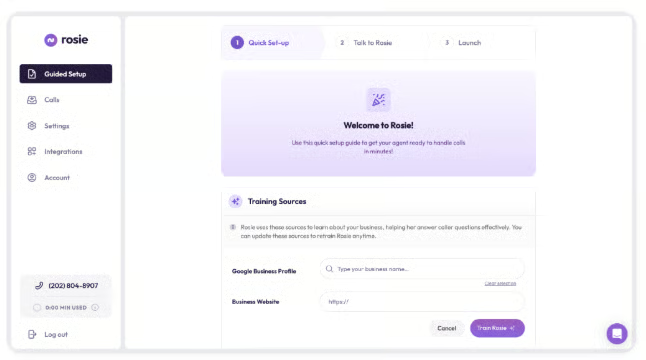
- Trained directly from your website and business content: Rosie is custom-trained on your specific business rather than a generic script, so callers get on-brand answers to FAQs and follow-up questions.
- Smart call filtering: Spam and robocalls are blocked before they ring through, so only genuine callers reach the AI.
- Smart message taking with multiple scenarios: Rosie routes different call types (quote requests, general inquiries, appointment requests) into distinct message formats, expanding from 2 scenarios on the entry plan up to unlimited on the top tier.
- Native iOS and Android companion app: Manage calls, settings, and messages on the go, included on every plan.
- Zapier integration to 1,000+ apps: Connects to CRMs and business tools without custom development.
- Warm handoff transfers (Scale plan and up): Live calls can be transferred directly to a team member rather than ending in a callback request.
Pricing
Plan | Monthly price | Minutes included | Key additions |
|---|---|---|---|
| Professional | $49 | Up to 250 minutes | Smart message taking (2 scenarios), 10+ agent voices, bilingual English/Spanish, spam detection |
| Scale (Most Popular) | $149 | Up to 1,000 minutes | Adds smart message taking (5 scenarios), appointment booking, direct call transfers, warm handoff transfers |
| Growth | $299 | Up to 2,000 minutes | Adds smart message taking (unlimited), training files |
Every plan includes a 7-day free trial, a native iOS and Android app, Zapier integration to 1,000+ apps, a custom agent name and greeting, and email/text notifications for every call. Annual billing gets 2 months free compared to paying monthly.
Add-on: Website Texting, $50/month for 25 AI-powered text conversations, $1 per additional conversation beyond that.
What to look for in an AI answering service
Not every AI answering service is built the same way, and the right fit depends on more than just price. Here's what's worth checking before you commit to a provider:
- How natural the voice sounds: A robotic-sounding agent undermines the whole point of automating your front desk. Look for a provider that offers multiple voice options and clearly demonstrates natural-sounding conversation, not just a demo reel.
- How much you can actually customize: Generic scripts only go so far. The strongest providers let you build custom questions, call flows, and agent personas so the AI collects the specific information your business needs, not a one-size-fits-all intake form.
- What it connects to: An answering service that can't sync with your CRM, calendar, or existing phone system creates more manual work than it saves. Check whether integrations are native or require a third-party tool like Zapier to bridge the gap.
- How billing actually works: Providers price this differently; some charge per minute, some per call, and others per unique customer served. Read past the sticker price to understand what triggers an overage charge, since that's where costs can climb fast.
- Whether it fits your industry: A general-purpose script won't ask the right follow-up questions for a law firm intake call the way an industry-trained agent would. If you're in a specialized field, a provider built around that vertical is worth the tradeoff even at a higher price.
- What happens when a human is actually needed: Look for warm transfer capability, the ability to hand a call to a live person mid-conversation, rather than a dead end that forces the caller to hang up and call back.
- What compliance it actually supports: If your business handles sensitive information, don't take HIPAA or SOC 2 claims at face value. Some providers list this as a built-in feature; others treat it as a custom, sales-scoped add-on, and the difference matters.
AI answering service vs traditional answering service
The two solve the same basic problem, missed calls, but work very differently.
A traditional answering service routes your calls to live human agents, often working from a call center, who follow a script to take messages or transfer calls. It's familiar and personal, but it comes with trade-offs: staffing costs that scale with call volume, inconsistent quality depending on who picks up, and limited availability outside of what the service contracts for.
An AI answering service replaces or supplements those human agents with a voice AI trained specifically on your business. It answers instantly, at any hour, and handles the same call the same way every time — no bad days, no inconsistent scripts. However, AI still struggles with unusual requests or emotionally sensitive situations that a human would navigate more naturally, which is why several providers on this list (Abby Connect AI, Smith.ai) build in a live-agent handoff for those moments.
For most small businesses, the choice isn't strictly one or the other. The providers worth considering are the ones that let AI handle the routine volume, appointment requests, FAQs, and basic intake, while keeping a path to a human for anything more complicated.
Related read: Best Answering Services in 2026
Signs your business needs an AI answering service
If a few of these sound familiar, it's worth taking a closer look at the providers above:
- You're missing calls during busy hours or after you close. Every missed call is a potential customer who may just call the next business on the list instead of leaving a voicemail.
- You're paying for a full-time receptionist mostly to answer routine questions. Hours, pricing, availability, and basic scheduling don't require a dedicated staff member if an AI can handle them reliably.
- Your team gets pulled off real work to answer the phone. Every interruption to take a message costs more than the phone call itself.
- You're relying on voicemail, and most callers hang up instead of leaving a message. Voicemail has a steep drop-off rate; an AI that actually answers keeps more of those calls from turning into lost business.
- You run a business where call volume spikes unpredictably. Marketing campaigns, seasonal demand, or word-of-mouth referrals can create sudden bursts that an AI can absorb without hiring temporary staff.
- You want consistent answers to common questions no matter who's working. An AI trained on your FAQs gives the same accurate answer every time, unlike a rotating staff of employees with varying levels of product knowledge.
Frequently asked questions (FAQs)
Is my data safe with an AI answering service?
It depends on the provider, and it's worth checking rather than assuming. Some providers build in compliance standards like HIPAA, SOC 2, or GDPR as a default across every plan; others treat compliance as a custom, sales-scoped add-on you have to request. If your business handles sensitive customer information, medical details, financial data, or legal matters, confirm exactly what's included before signing up rather than taking a general "secure" claim at face value.
Can I keep my current business phone number?
Most providers support porting your existing number, but not all of them. Some assign a new dedicated number per agent instead and route calls to it through conditional forwarding rather than a full port. If keeping your existing number matters for branding or marketing materials already in circulation, confirm the provider's specific porting policy before committing.
Do callers know they're talking to an AI?
Usually, yes. Most AI answering services identify themselves as AI up front rather than trying to pass as human, both for transparency and because callers tend to react better when they know what they're talking to from the start. Reaction is mixed: some callers find it slicker and more efficient than voicemail, while a smaller number are put off by not reaching a live person right away, which is part of why several providers build in a live-agent handoff option for anyone who asks for one.
Do I need technical skills to set up an AI answering service?
No, and this is one of the category's biggest selling points over building a custom voice AI system from scratch. Most providers on this list are self-serve; some, like Dialzara, train themselves directly from your website URL, while others, like Abby Connect and Slang.ai, include hands-on onboarding support at no extra cost. None require coding or an engineering team to get a working agent live.
What happens if the AI can't answer a caller's question?
It depends on how the provider handles escalation. The stronger providers on this list, Abby Connect AI, Smith.ai, and Dialzara, build in a live-agent or warm-transfer option, so a caller with an unusual request gets routed to a human instead of hitting a dead end. Others rely more heavily on message-taking: the AI captures what it can and leaves the follow-up to you. When comparing providers, it's worth checking whether "escalation" means a live handoff during the call or just a more detailed voicemail waiting in your inbox afterward.